
Laser Projectors, Laser Assisted Layup technology - A407
| Laser Projectors, Laser Assisted Layup technology | |
|---|---|
| Document Type | Article |
| Document Identifier | 407 |
| Tags | |
| Prerequisites | |
Introduction[edit | edit source]
To increase productivity, accuracy, and traceability of composite part manufacture, laser projection systems were developed to improve the speed, accuracy, and traceability of ply placement during layup. With a laser templating system, the system projects a light line to a high degree of accuracy on a complex 3-D surface, showing the operator where to position the ply or component. This is accomplished by having the laser light trace the outline repeatedly as fast as possible. Refresh rates faster than 30 Hz are perceived as a solid line by the human eye. The laser can also project the assembly part number, material fiber direction, and other instructions directly on the part where assembly is required. This significantly reduces operator workload, leading to fewer mistakes and faster turnaround times.
Significance[edit | edit source]
Laser systems are intended to decrease the amount of time and errors that occur during the hand lamination process in a production environment. Understanding how these systems work, how they are set up, and how they affect the operator is a key element in implementing them effectively. They also address the high skill level required in hand layup as laser systems replace some skill-dependent steps with accurate, repeatable ply positioning.
Scope[edit | edit source]
This article outlines the main features of these laser systems. This includes advantages, setup requirements, functions, and expected return on investment (ROI) from incorporating the equipment in the lamination process.
Setup of Laser Projection System[edit | edit source]
Safety concerns (Laser safety)[edit | edit source]
The word “laser” conjures images of high power systems. Many templating systems operate at low power and may meet eye-safe operating classifications, but supplier guidance and laser safety procedures must still be followed. Safety precautions from the system supplier, however, should be rigidly adhered to.
Positioning of laser projector over tool[edit | edit source]
The typical laser projection system operates at 3 m (10’) to 4.57 m (15') from the tool surface and covers an area between 3 m (10’) x 3 m (10’) to 4.57 m (15') x 4.57 m (15'). These coverage values apply when the projector is 4.57 m (15') from the surface. The projector should be positioned as close to normal to the tool surface as possible.

To project a template outline, the projector must be able to view the complete work area that is to be assembled. Due to the complexity and size of some composite tool shapes, multiple projectors may be required for ply layup on a single tool. Large convex and concave assemblies, typical of an aircraft fuselage or engine nacelle, may be difficult to see when only one projector is used.

With the outline projected on the tool, the operator can quickly and accurately apply the material in the part build and proceed through the various steps required to complete an assembly. The time saving advantages of these systems are shown in the graphic below.

Expected operator time saved by the implementation of a laser projection system in the layup process.
Producing accurate projections in three dimensions[edit | edit source]
To project a 3D template pattern to a high degree of accuracy onto the tool surface, the system must first detect a series of retro-reflective target points located on the periphery of the tool surface. By comparing the position it detects these targets to a map of the targets in the computer model, the software can triangulate the position of the projectors relative to the tool surface. The computer then calculates and projects a laser beam onto the tool, outlining to a high degree of accuracy, the appropriate projection information (or the template). Typically, this would be the ply outline corrected for any known features, including existing material already laid up.

A laser templating system typically requires at least four tooling target locations for projector registration. High-accuracy targets are placed in the precision-machined tooling locations. The targets have a silver retro-reflective center point. When the laser light hits the retroreflective target, the signal is reflected to the laser. This allows the laser to auto-collimate the target locations of the tooling. Once the four or more tooling targets are located, the laser projects the accurate outline of the ply on the 3D surface.
Once the operator has placed the ply, a simple controller (handheld, foot pedal or other) moves the projection to the next ply to allow the operator to position the subsequent plies. No realignment is required. This way, a considerable amount of human non-value-added work is eliminated. A laser projector is shown below.

Additional Features[edit | edit source]
Which features are available depend greatly on the supplier. However, some common features include:
- Multi-Tasking: A benefit where one system comprised of one or more projectors that can project on multiple parts in parallel. Each operator works independently from the same projection system. This allows the investment in a laser projection system to be shared multiple-fold over many part, offering multiple in productivity.
- Text Projection on the part: This allows for additional instructions to be given to the operator, further decreasing the possibility for error. See example above.
- Configuration management features: This can reduce paperwork and improve traceability. Steps are recorded for traceability in the computer and can show pictures and video. Wireless control for the operator and displays for operator information are all features to increase overall efficiency and error reduction.
- Retro-reflective control: Laser detects a special retro-reflective material in a certain location, and executes a command. This can be used by an operator to cycle between steps in the layup when needed.


ROI Inputs in Laser Projection[edit | edit source]
The cost savings below are to be compared against the capital cost of a laser projection system. The ROI can often be less than one year with a single shift usage, according to some manufacturers. The key advantages are the elimination of physical templates altogether. This alone proves to be very valuable, as this can increase cycle time by up to 50%, eliminate template storage completely, and reduce the frequency of operator error. Additional benefits noted are the automation of several traceability and management features, lower operator training requirements, and not updating physical templates with the new version of the part.
Direct benefits of implementation[edit | edit source]
- No manufactured templates or drawings
- Fast turnaround (< 1 day possible) vs 1+ months from start to manufactured templates available
- Reduced personnel health problems
- Full traceability of every step
- Significant quality increase and reduced scrap parts
- Increased accuracy (Typically +/- 0.030”)
- Computer station can be reused for ERP/MRP/Work Instructions
Cons of laser projection system[edit | edit source]
- Capital cost of purchase
- Some computer infrastructure is required
- Minimum computer competency required
Present Advances in the State of the Art in Laser Projection: AI integration[edit | edit source]
More sophisticated systems to further aid operators in the layup process are being developed. This includes the implementation of a new AI-powered vision, which can detect ply misalignment during deposition and the presence of foreign objects. It is expected that the implementation of these systems will allow for lower cycle times and reduced variability in the production of parts in the hand lamination process.


Welcome
Welcome to the CKN Knowledge in Practice Centre (KPC). The KPC is a resource for learning and applying scientific knowledge to the practice of composites manufacturing. As you navigate around the KPC, refer back to the information on this right-hand pane as a resource for understanding the intricacies of composites processing and why the KPC is laid out in the way that it is. The following video explains the KPC approach:
Understanding Composites Processing
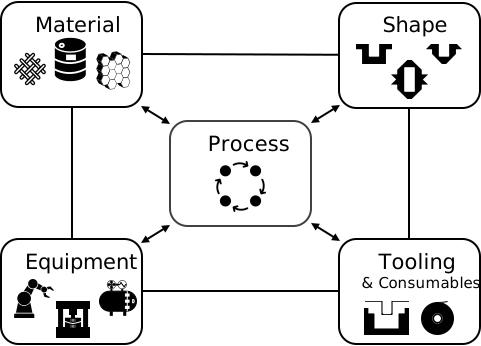
The Knowledge in Practice Centre (KPC) is centered around a structured method of thinking about composite material manufacturing. From the top down, the heirarchy consists of:
- The factory
- Factory cells and/or the factory layout
- Process steps (embodied in the factory process flow) consisting of:
The way that the material, shape, tooling & consumables and equipment (abbreviated as MSTE) interact with each other during a process step is critical to the outcome of the manufacturing step, and ultimately critical to the quality of the finished part. The interactions between MSTE during a process step can be numerous and complex, but the Knowledge in Practice Centre aims to make you aware of these interactions, understand how one parameter affects another, and understand how to analyze the problem using a systems based approach. Using this approach, the factory can then be developed with a complete understanding and control of all interactions.
Interrelationship of Function, Shape, Material & Process
Design for manufacturing is critical to ensuring the producibility of a part. Trouble arises when it is considered too late or not at all in the design process. Conversely, process design (controlling the interactions between shape, material, tooling & consumables and equipment to achieve a desired outcome) must always consider the shape and material of the part. Ashby has developed and popularized the approach linking design (function) to the choice of material and shape, which influence the process selected and vice versa, as shown below:
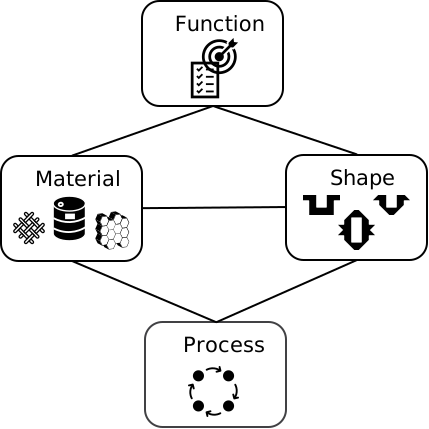
Within the Knowledge in Practice Centre the same methodology is applied but the process is more fully defined by also explicitly calling out the equipment and tooling & consumables. Note that in common usage, a process which consists of many steps can be arbitrarily defined by just one step, e.g. "spray-up". Though convenient, this can be misleading.

Workflows
The KPC's Practice and Case Study volumes consist of three types of workflows:
- Development - Analyzing the interactions between MSTE in the process steps to make decisions on processing parameters and understanding how the process steps and factory cells fit within the factory.
- Troubleshooting - Guiding you to possible causes of processing issues affecting either cost, rate or quality and directing you to the most appropriate development workflow to improve the process
- Optimization - An expansion on the development workflows where a larger number of options are considered to achieve the best mixture of cost, rate & quality for your application.
To use this website, you must agree to our Terms and Conditions and Privacy Policy.
By clicking "I Accept" below, you confirm that you have read, understood, and accepted our Terms and Conditions and Privacy Policy.

